
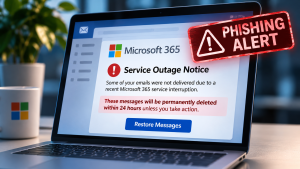
Cybercriminals are impersonating Microsoft 365 service notifications in a recently identified phishing campaign targeting businesses worldwide. Here's what you need to know and how to protect your organization.
Microsoft 365 is essential to daily business operations, from Outlook emails and Teams meetings to SharePoint collaboration. Unfortunately, cybercriminals know how much businesses depend on these tools, and they're using that familiarity to make phishing emails appear legitimate.
On November 16, 2026, Microsoft published findings about a widespread phishing campaign involving fake Microsoft 365 outage notifications. The campaign, first observed on November 13, targeted organizations across multiple industries with messages designed to trick employees into clicking suspicious links.
The good news? Understanding how these messages work can help your team recognize and avoid them.
What's Happening?
According to Microsoft Threat Intelligence, attackers are sending emails that appear to be official Microsoft 365 service-health notifications.
These messages claim that a recent service outage prevented certain emails from reaching the recipient's inbox. To make the situation seem urgent, they warn that the missing messages will be permanently deleted within 24 hours unless the recipient takes action.
The emails include buttons such as "Restore Messages" or "Take Action," directing recipients away from Microsoft's legitimate services.
Microsoft believes the campaign was likely designed to steal login credentials, although its investigation did not confirm that credentials were captured or accounts compromised.
Why This Threat Matters for Businesses
Phishing attacks aren't always filled with obvious spelling errors or suspicious-looking attachments. Today's attackers frequently impersonate familiar technology platforms and use realistic business scenarios to encourage employees to act quickly.
In this campaign, attackers took advantage of three common workplace concerns:
- Missing important emails: Employees may worry that customer requests, invoices, or time-sensitive messages have been lost.
- Service disruptions: Because businesses rely on Microsoft 365, an unexpected outage notification may seem believable.
- Urgent deadlines: A warning that emails will disappear within 24 hours creates pressure to act without verifying the message.
If an employee enters their credentials on a fraudulent website, attackers could potentially gain access to business email, sensitive information, or other connected Microsoft 365 services.
5 Ways to Protect Your Business From Microsoft 365 Phishing Scams
1. Verify Unexpected Service Notifications
If you receive an email claiming Microsoft 365 is experiencing an outage, don't automatically trust the message. Contact your IT provider or have an authorized administrator check the Microsoft 365 admin center to confirm whether an issue exists.
2. Think Before Clicking
Be cautious of emails requesting immediate action, especially those claiming you'll lose access to messages, files, or accounts. Rather than clicking links in unexpected emails, navigate directly to the service through your usual trusted method.
3. Use Multi-Factor Authentication (MFA)
MFA provides an additional layer of account protection beyond passwords. Phishing-resistant authentication methods, such as passkeys or security keys, offer stronger protection against credential theft.
4. Keep Employees Informed
Cybersecurity awareness doesn't need to be complicated. Regular reminders about suspicious links, unusual requests, and impersonation attempts can help employees make better decisions when unexpected messages arrive.
5. Report Suspicious Emails
Encourage employees to report questionable emails to their IT team rather than simply deleting them. Early reporting gives your IT provider an opportunity to investigate and determine whether similar messages have reached other employees.
What If Someone Already Clicked?
Clicking a suspicious link doesn't automatically mean an account has been compromised.
However, if an employee clicked a link or entered their Microsoft 365 credentials, they should notify their IT provider immediately.
Your IT team can review account activity, investigate suspicious sign-ins, reset credentials when appropriate, and take additional steps to protect business information.
The sooner a potential incident is reported, the sooner your organization can respond.
Stay Informed, Stay Protected
Cybercriminals continue to find new ways to make phishing messages look convincing, but businesses don't have to navigate these threats alone.
With the right security tools, employee awareness, and proactive IT support, organizations can reduce their exposure to phishing attacks while keeping employees focused on their work.
Not sure whether your Microsoft 365 environment has the right protections in place? Contact our team to discuss your email security, account protection, and cybersecurity strategy.
Source: Microsoft Security Blog, November 16, 2026 — High-Volume Phishing Campaign Uses Microsoft 365 Outage Lures to Target Multiple Industry Sectors

