
If you have spent any time researching AI tools for your business, you have probably felt the overwhelm. New platforms launch every week. Every vendor claims their tool is the one you need. And the terminology, large language models, generative AI, agentic workflows can make it feel like you need a computer science degree just to ask the right questions.
You do not. What you need is a practical framework for matching the right tool to the right job. Here is how to think about it.
Why Platform Selection Matters More Than You Think
Choosing the wrong AI platform is not just a matter of wasted money. It is a matter of wasted time, frustrated teams, and in some cases, real security exposure.
When you select a platform that does not integrate with your existing systems, your team ends up working across disconnected tools, copying and pasting between applications, re-entering data, and spending more time managing the technology than using it. When you select a platform without understanding how it handles your data, you may be sending sensitive business information to external servers without realizing it.
The goal of platform selection is not to find the most powerful AI tool. It is to find the right tool for your specific workflows, your existing environment, and your security requirements.
The Major Platforms and What They Are Actually Good For
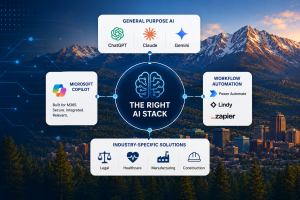
General Purpose AI — ChatGPT, Claude, Gemini
These are the platforms most people encounter first. They are capable, accessible, and genuinely useful for a wide range of tasks: drafting content, summarizing documents, answering research questions, generating ideas, and working through complex reasoning problems.
ChatGPT excels at logical tasks, coding assistance, and structured analysis. Claude is often preferred for longer documents and nuanced writing, its large context window makes it well-suited for reviewing lengthy reports or contracts. Gemini integrates tightly with Google Workspace for teams already operating in that environment.
The important caveat for business use is data handling. These platforms are consumer-grade by default. When your team members enter client information, financial data, or proprietary business details into a free or personal account, that data may be used to train the underlying model. For businesses in regulated industries, legal, financial services, healthcare, manufacturing with government contracts, that is not an acceptable risk profile.
Enterprise versions of these tools address some of those concerns, but they require careful configuration and a clear understanding of the terms governing your data.
Microsoft Copilot — For Microsoft 365 Environments
If your organization runs on Microsoft 365, Copilot deserves serious consideration as your primary AI platform, and not just because Microsoft built it.
Copilot works inside the applications your team already uses every day: Word, Excel, Outlook, Teams, and PowerPoint. It accesses your organization's data within your M365 tenant, meaning it draws on your actual business information to generate relevant, contextual output. And critically, it operates under your existing security policies and permissions, your data does not leave your environment.
For a law firm in Denver summarizing case files, a manufacturer reviewing supplier contracts, or a financial advisory practice preparing client reports, Copilot delivers AI assistance inside the workflow rather than requiring your team to step outside it. That integration is what drives consistent adoption, and consistent adoption is what drives ROI.
According to Microsoft's Copilot adoption research, organizations that deploy Copilot in a well-configured M365 environment report an average of 1.2 hours saved per user per day in the first month. For a 20-person team, that is a meaningful productivity shift from tools already included in your subscription.
Workflow Automation — Power Automate, Lindy, Zapier
These platforms are distinct from generative AI tools but increasingly incorporate AI capabilities. Their primary function is connecting your existing systems and automating repetitive processes, approval workflows, data transfers between applications, notification triggers, and routine reporting.
For small and midsized businesses with staff spending significant time on manual, repetitive tasks, workflow automation often delivers faster and more measurable ROI than generative AI alone. The two are most powerful in combination: generative AI handles the judgment-based tasks, automation handles the mechanical ones.
Industry-Specific AI Solutions
Depending on your vertical, there are AI tools built specifically for your workflows. Legal technology platforms with AI-assisted contract review. Healthcare solutions with AI-powered clinical documentation. Construction project management tools with AI scheduling and resource optimization.
These specialized tools often deliver higher ROI in their specific domain than general-purpose platforms, but they require careful evaluation of data handling, integration with your existing stack, and vendor stability before committing.
One Question That Makes the Decision Simpler
The framework that cuts through the noise is straightforward. Start with the problem you are trying to solve, not the platform you are trying to evaluate.
What specific task is consuming the most time in your organization right now? Where are errors most costly? Where do your people spend energy on work that does not require their expertise?
The answers to those questions point you toward the right category of tool. From there, the evaluation criteria are consistent regardless of platform: does it integrate with your existing environment, how does it handle your data, what does adoption require from your team, and what does the ROI look like over a realistic timeframe?
Gartner's research on AI platform selection consistently identifies use case clarity as the single most important factor in successful AI tool deployment. Businesses that start with a defined problem report significantly higher satisfaction with their AI investments than those that start with a platform and look for applications afterward.
CKT: Helping Colorado Businesses Build the Right AI Stack
At Common Knowledge Technology, we help businesses across Colorado evaluate AI platforms against their specific environments, workflows, and compliance requirements. We are not resellers optimizing for margin. We are your Technology Coach, which means we tell you which tool is right for your situation, including when the answer is to start with what you already have before purchasing anything new.
For most of our clients on Microsoft 365, that conversation starts with Copilot readiness. For clients with significant workflow automation needs, it includes Power Automate or third-party automation platforms. For clients in specialized verticals, it means evaluating industry-specific tools against the same security and integration standards we apply to everything else.
The goal is a technology stack that works as a coherent whole, not a collection of disconnected tools your team has to work around.

